

 HU


How to Read an iPhone Panic Log: Identify Potential Issues Before a Repair
16-11-2026 • Olvasási idő: 27 min

An iPhone that unexpectedly restarts or frequently freezes may indicate an underlying problem. An iPhone Panic Log can provide clues about potential system errors and help you make a more accurate diagnosis.
Discover how to read a Panic Log, what the error codes mean, and why checking existing error reports before a repair can help prevent misunderstandings with customers.
What Is an iPhone Panic Log?
An iPhone Panic Log, also known as a Panic Full log, is a system report that an iPhone may generate when the operating system encounters a serious error it cannot recover from. This type of system error is also known as a kernel panic.
A kernel panic can cause an iPhone to restart unexpectedly. The associated Panic Log contains technical information about the error and may provide clues about which component or system could be causing the problem.
For example, the issue could involve sensors, battery communication, the charging connector, or the motherboard. Software-related errors may also play a role. A Panic Log does not always identify exactly which component is defective. Instead, the report serves as a starting point for further investigation. By combining the error message with additional checks, you can more accurately determine where the problem may originate.
Why Check a Panic Log Before an iPhone Repair?
When a customer brings in an iPhone for repair, it is important to look beyond the reported issue. Sometimes, a device already has other problems that are not immediately visible. By checking existing Panic Logs before starting a repair, with the customer's permission, you can identify potential problems at an early stage.
This offers several benefits for your repair business:
Identify existing problems: Discover potential system errors before starting a repair.
Prevent misunderstandings: Discuss previously recorded errors with the customer to clarify which problems may have already existed.
Make more accurate diagnoses: Use error codes as clues to investigate potential causes more efficiently.
Work professionally and transparently: Document your findings and inform customers about any additional problems beforehand.
Practical Example: Identifying Existing Problems Before a Repair
A customer brings in an iPhone for a display replacement. During the intake process, you check the existing Panic Logs with the customer's permission. You discover that the device previously recorded a serious system error.
You discuss this finding with the customer and document it before starting the repair. What if the iPhone unexpectedly restarts after the display replacement? You can then use the earlier error report to investigate whether the problem was already present before the repair.
This gives customers greater insight into potential existing issues and helps prevent misunderstandings after a repair.

How to Find and Read a Panic Log on an iPhone
You can view existing Panic Logs directly through the iPhone settings. No additional software is required.
Follow these steps:
Open Settings on the iPhone.
Go to Privacy & Security.
Select Analytics & Improvements.
Open Analytics Data.
Look for files beginning with panic-full or panic.full.
Open a recent file and search for panicString.
The Panic Log contains technical information about the system error. The panicString often provides important clues about the possible cause.
Also, check the date and time of the file. This allows you to determine when the error was recorded and whether it matches the customer's reported issues. Not every iPhone contains Panic Logs. If no relevant files are available, this does not automatically mean that the device is free from defects.
What Do the Different iPhone Panic Log Error Codes Mean?
A Panic Log can contain various error messages. Some refer to a specific sensor, while others relate to a larger part of the system.
Below, you will find common error messages and their possible meanings.
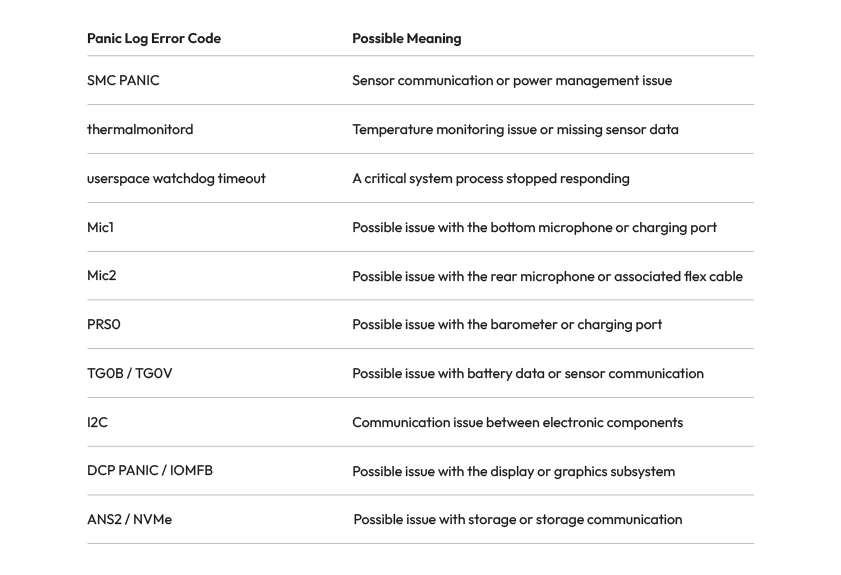
Error codes such as SMC PANIC, thermalmonitord, and Mic1 can provide clues about potential issues with sensors, temperature monitoring, or other components. The exact meaning may vary depending on the iPhone model. Therefore, use these error messages as a starting point for further investigation rather than as a definitive diagnosis. Scroll to the bottom of this blog to look up all iPhone Panic Log error codes.
Why Do Panic Log Error Codes Differ Between iPhone Models?
Not every Panic Log error code has the same meaning across all iPhone models.
For example, the code 0x200000 may indicate an issue with the proximity sensor on an iPhone 14, while the same code on a standard iPhone 15 may be related to the wireless charging module.
Therefore, always check the exact iPhone model before linking an error code to a specific component.
Multiple sensor issues may also occur simultaneously. An error code alone is not enough to determine with certainty which component needs to be replaced.
How to Use Panic Logs During the Repair Intake Process
Want to start using Panic Logs in your repair business? Make checking existing error reports part of your intake process when there is a reason to do so. Below, we share three key points to help you use this information effectively:
Check the device before the repair: Ask about existing problems and, with the customer's permission, check whether any relevant Panic Logs are available.
Discuss error messages with the customer: Explain what the identified error codes may indicate and discuss whether further investigation is necessary.
Document your findings: Record relevant error messages and the condition of the device in the repair order. This allows you to demonstrate which problems may have already existed before the repair.
By incorporating these steps into your workflow, you can make more accurate diagnoses and help prevent misunderstandings with customers.
The Right iPhone Part for Your Repair
Does a Panic Log indicate a potential hardware issue? Always investigate the cause before replacing a component.
At Foneday, you will find more than 15,000 smartphone parts for professional repair technicians. From iPhone batteries and displays to charging connectors and other components, discover our product range and easily order the parts you need for your next repair.
Explore Our iPhone Parts →

FAQ: Frequently Asked Questions About iPhone Panic Logs
What Is a Panic Log on an iPhone?
A Panic Log is a system report that may be generated when an iPhone experiences a serious error. The report contains technical information that can help repair technicians investigate potential hardware or software problems.
How Can You Read an iPhone Panic Log?
Go to Settings → Privacy & Security → Analytics & Improvements → Analytics Data. Then look for a file containing panic-full or panic.full in its name and check the error message under panicString.
Why Does My iPhone Keep Restarting?
An iPhone that frequently restarts may have issues related to sensors, battery communication, other hardware components, or software. A Panic Log can provide clues about the possible cause, but further investigation is still necessary.
Can a Panic Log Identify Which Component Is Defective?
Not always. Some error codes refer to a specific component or sensor, but the same error message may have multiple causes. Therefore, always check the iPhone model and perform additional tests before replacing a component.
Is It Recommended to Check a Panic Log Before a Repair?
Yes, especially when an iPhone unexpectedly restarts or experiences other system issues. With the customer's permission, you can check existing Panic Logs and document relevant findings. This allows you to discuss potential problems beforehand and helps prevent misunderstandings afterward.
Overview of iPhone Panic Log Error Codes by Model
Want to know what a specific iPhone Panic Log error code means? In the overview below, you will find error codes for various iPhone models, from older devices to the latest generations.
For each error code, you can see which component may be causing problems and how reliable the available information is. Keep in mind that the same error code may have a different meaning depending on the iPhone model.
Use this overview as a diagnostic tool and always verify the exact cause before replacing a component.
General iPhone Panic Log Error Codes
iPhone Model / Error Family | Error Code | Possible Cause | Confidence |
|---|---|---|---|
Watchdog | logd | Software (iOS or restored data); no specific component identified | Medium |
Watchdog | springboard | Software (iOS); no specific component identified | Medium |
Watchdog | wifid | Check software first; otherwise Wi-Fi/Bluetooth module on the logic board | Low |
Watchdog | thermalmonitord | Probably software if no missing sensor is reported | Low |
AOP | bosch | Charging port flex carrying speaker signals | Medium |
AOP | no_pulse | Taptic Engine, audio codec or upper sensor flex after corrosion | Low |
AOP | dart | Unknown; linked to a faulty Taptic Engine in one reported case | Low |
AOP | data_abort | Processor connections or NAND on the logic board | Low |
AOP | pulse_pearl | Possible Face ID/TrueDepth module; unconfirmed | Low |
Secure Enclave | sep_rom | SEP ROM chip, EEPROM or connection to the processor | Medium |
Secure Enclave | sep_panic | Logic board or corrupted firmware/iOS | Low |
Secure Enclave | sep_mpm | Logic board, Secure Enclave | Low |
NAND storage | ans2 | NAND storage or communication lines | Medium |
NAND storage | nvme | NAND storage or power rails | Low |
NAND storage | ans | NAND storage or communication with the processor | Low |
NAND storage | h2fmi | NAND or storage controller on older models | Low |
Display | iomfb | Display assembly; possibly logic board | Low |
Display | dcp | Display subsystem or logic board; unconfirmed | Low |
Display | apt-firmware | Possible display assembly; unconfirmed | Low |
I2C | als | Front camera flex or ambient light sensor | Medium |
I2C | audio-speaker-top | Earpiece speaker or front camera/sensor flex | Low |
I2C | roswell | Display or touchscreen controller | Low |
I2C | display-pmu | OLED display power circuit | Low |
I2C | display-eeprom | Display or I2C3 connection on the logic board | Low |
I2C | ad5860 | Charging port flex or Taptic Engine | Medium |
I2C | mic-temp-sens | Possible Lightning charging port flex | Low |
I2C | i2c2 | Front camera flex or other components on the same bus | Low |
I2C | i2c3 | Display, touchscreen, display connector or charging port | Low |
Processor | sochot | Logic board, power management or overheating; check Wi-Fi/audio areas | Medium |
Processor | amcc | Processor, memory or cache controller | Low |
Processor | pmp | Processor power supply | Low |
Processor | sleepwake | Software or possibly audio codec/processor power supply | Low |
Wi-Fi/Bluetooth | wlan | Wi-Fi/Bluetooth module or antenna | Medium |
Modem | baseband | Baseband modem on the logic board | Low |
Software | undef_instr | iOS or incompatible app; possibly RAM/NAND | Medium |
Software | physmap-fault | Software first; possibly memory or logic board | Low |
Software | ifetch_abort | Software or logic board; cause unknown | Low |
Software | ppl | Kernel software or memory corruption | Low |
Unknown | socd-ap-wdt | Unresponsive processor; investigate software first | Low |
Unknown | socd-iboot | Unknown; additional information in SOCDContainers | Low |
Unknown | mfm-port-enable | Possible Wi-Fi/Bluetooth or PCIe connection; unconfirmed | Low |
Processor | fed-l1c-iside-parity | Processor or logic board, instruction cache error | Low |
Processor | halt_cpu | Secondary message; check the main panic code | Low |
Watchdog | Not specified | Usually software; possibly hardware if the issue persists after restoring | Low |
AOP | Not specified | Power button flex or front camera assembly | Medium |
AOP | Not specified | Sensor connected to the AOP coprocessor; component unknown | Low |
I2C | Not specified | Component on the affected I2C bus; model-dependent | Low |
SMC | Not specified | Components on the SMC I2C master bus | Low |
SMC | Not specified | Processor power rails and inductors | Low |
SMC | data_abort | Processor communication on the logic board | Low |
Software | data_abort | Software, graphics driver or possibly hardware | Low |
iPhone 7, 8, X, XR, XS, SE, 11 and 12 – Error Codes
iPhone Model / Error Family | Error Code | Possible Cause | Confidence |
|---|---|---|---|
iPhone 7 | tg0b | Battery or battery connector | High |
iPhone 7 Plus | tg0b | Battery or battery connector | High |
iPhone 8 | tg0b | Battery or battery connector | Medium |
iPhone 8 Plus | tg0b | Battery or battery connector | Medium |
iPhone X | tg0b | Battery, connector or data lines | High |
iPhone X | tg0v | Battery, connector or data lines | High |
iPhone SE (1st generation) | tg0b | Battery or resistor near the battery connector | Medium |
iPhone SE (1st generation) | tg0v | Battery or data lines | Low |
iPhone 7 | tg0v | Battery or data lines | Low |
iPhone 7 Plus | tg0v | Battery or data lines | Low |
iPhone 8 | tg0v | Battery or data lines | Low |
iPhone 8 Plus | tg0v | Battery or data lines | Low |
iPhone X | prs0 | Charging port flex or barometer | High |
iPhone X | mic1 | Charging port flex or bottom microphone | Medium |
iPhone 7 | mic1 | Charging port flex or bottom microphone | Low |
iPhone 7 Plus | mic1 | Charging port flex or bottom microphone | Low |
iPhone 8 | mic1 | Charging port flex or bottom microphone | Low |
iPhone 8 Plus | mic1 | Charging port flex or bottom microphone | Low |
iPhone 7 | prs0 | Charging port flex or barometer | Low |
iPhone 7 Plus | prs0 | Charging port flex or barometer | Low |
iPhone 8 | prs0 | Charging port flex or barometer | Low |
iPhone 8 Plus | prs0 | Charging port flex or barometer | Low |
iPhone X | mic2 | Power button/flash flex or rear microphone | Low |
iPhone 7 | mic2 | Power button/flash flex or rear microphone | Low |
iPhone 7 Plus | mic2 | Power button/flash flex or rear microphone | Low |
iPhone 8 | mic2 | Power button/flash flex or rear microphone | Low |
iPhone 8 Plus | mic2 | Power button/flash flex or rear microphone | Low |
iPhone 8 | tp1a | Temperature sensor on the logic board | Medium |
iPhone X | tp1a | Temperature sensor on the logic board | Low |
iPhone SE (1st generation) | tp1a | Temperature sensor near the rear camera | Low |
iPhone SE (1st generation) | tp3r | Temperature sensor on the logic board | Low |
iPhone XS Max | tp3r | Temperature sensor on the logic board | Low |
iPhone SE (2nd generation) | prs0 | Charging port flex or barometer | High |
iPhone XR | prs0 | Charging port flex or barometer | High |
iPhone XS | prs0 | Charging port flex or barometer | High |
iPhone XS Max | prs0 | Charging port flex or barometer | High |
iPhone 11 | prs0 | Charging port flex or barometer | High |
iPhone 11 Pro | prs0 | Charging port flex or barometer | High |
iPhone 11 Pro Max | prs0 | Charging port flex or barometer | High |
iPhone 12 | prs0 | Charging port flex or barometer | High |
iPhone 12 mini | prs0 | Charging port flex or barometer | High |
iPhone 12 Pro | prs0 | Charging port flex or barometer | High |
iPhone 12 Pro Max | prs0 | Charging port flex or barometer | High |
iPhone SE (2nd generation) | mic1 | Charging port flex or I2C connection on the logic board | Medium |
iPhone XR | mic1 | Charging port flex, bottom microphone | High |
iPhone XS | mic1 | Charging port flex, bottom microphone | High |
iPhone XS Max | mic1 | Charging port flex, bottom microphone | High |
iPhone 11 | mic1 | Charging port flex, bottom microphone | High |
iPhone 11 Pro | mic1 | Charging port flex, bottom microphone | High |
iPhone 11 Pro Max | mic1 | Charging port flex, bottom microphone | High |
iPhone 12 | mic1 | Charging port flex, bottom microphone | High |
iPhone 12 mini | mic1 | Charging port flex, bottom microphone | High |
iPhone 12 Pro | mic1 | Charging port flex, bottom microphone | High |
iPhone 12 Pro Max | mic1 | Charging port flex, bottom microphone | High |
iPhone SE (2nd generation) | mic2 | Power button flex or secondary microphone | High |
iPhone XR | mic2 | Power button flex or secondary microphone | High |
iPhone XS | mic2 | Power button flex or secondary microphone | High |
iPhone XS Max | mic2 | Power button flex or secondary microphone | High |
iPhone 11 | mic2 | Power button flex or secondary microphone | High |
iPhone 11 Pro | mic2 | Power button flex or secondary microphone | High |
iPhone 11 Pro Max | mic2 | Power button flex or secondary microphone | High |
iPhone 12 | mic2 | Power button flex or secondary microphone | High |
iPhone 12 mini | mic2 | Power button flex or secondary microphone | High |
iPhone 12 Pro | mic2 | Power button flex or secondary microphone | High |
iPhone 12 Pro Max | mic2 | Power button flex or secondary microphone | High |
iPhone SE (2nd generation) | tg0b | Battery or data line | High |
iPhone XR | tg0b | Battery or data line | High |
iPhone XS | tg0b | Battery or data line | High |
iPhone XS Max | tg0b | Battery or data line | High |
iPhone 11 | tg0b | Battery or data line | High |
iPhone 11 Pro | tg0b | Battery or charging port flex | High |
iPhone 11 Pro Max | tg0b | Battery or charging port flex | High |
iPhone 12 | tg0b | Battery or data line | High |
iPhone 12 mini | tg0b | Battery or data line | High |
iPhone 12 Pro | tg0b | Battery or data line | High |
iPhone 12 Pro Max | tg0b | Battery or data line | High |
iPhone SE (2nd generation) | tg0v | Battery or data line | High |
iPhone XR | tg0v | Battery or data line | High |
iPhone XS | tg0v | Battery or data line | High |
iPhone XS Max | tg0v | Battery or data line | High |
iPhone 11 | tg0v | Battery or data line | High |
iPhone 11 Pro | tg0v | Battery or charging port flex | High |
iPhone 11 Pro Max | tg0v | Battery or charging port flex | High |
iPhone 12 | tg0v | Battery or data line | High |
iPhone 12 mini | tg0v | Battery or data line | High |
iPhone 12 Pro | tg0v | Battery or data line | High |
iPhone 12 Pro Max | tg0v | Battery or data line | High |
iPhone SE (2nd generation) | tb0v | Battery | Low |
iPhone XR | tb0v | Battery | Low |
iPhone XS | tb0v | Battery | Low |
iPhone XS Max | tb0v | Battery | Low |
iPhone 11 | tb0v | Battery | Low |
iPhone 11 Pro | tb0v | Battery | Low |
iPhone 11 Pro Max | tb0v | Battery | Low |
iPhone 12 | tb0v | Battery | Low |
iPhone 12 mini | tb0v | Battery | Low |
iPhone 12 Pro | tb0v | Battery | Low |
iPhone 12 Pro Max | tb0v | Battery | Low |
iPhone 12 | eiger | Charging port flex | Low |
iPhone 12 mini | eiger | Charging port flex | Low |
iPhone 12 Pro | eiger | Charging port flex | Low |
iPhone 12 Pro Max | eiger | Charging port flex | Low |
iPhone 12 | tp3r | Temperature sensor on the logic board | Low |
iPhone 12 mini | tp3r | Temperature sensor on the logic board | Low |
iPhone 12 Pro | tp3r | Temperature sensor on the logic board | Low |
iPhone 12 Pro Max | tp3r | Temperature sensor on the logic board | Low |
iPhone XR | i2c0 | Charging port flex; possibly camera, battery connector or sensor flex | Medium |
iPhone XS | i2c0 | Charging port flex; possibly camera, battery connector or sensor flex | Medium |
iPhone XS Max | i2c0 | Charging port flex; possibly camera, battery connector or sensor flex | Medium |
iPhone 7 | Not specified | Light sensor, microphone, power button flex or Touch ID flex | Low |
iPhone 7 Plus | Not specified | Light sensor, microphone, power button flex or Touch ID flex | Low |
iPhone 8 | Not specified | Light sensor, microphone, power button flex or Touch ID flex | Low |
iPhone 8 Plus | Not specified | Light sensor, microphone, power button flex or Touch ID flex | Low |
iPhone X | Not specified | Light sensor, microphone, power button flex or Touch ID flex | Low |
iPhone SE (2nd generation) | Not specified | Light sensor, microphone, power button flex or Touch ID flex | Low |
iPhone SE (3rd generation) | 0x10000 | Possible power button flex; unconfirmed | Low |
iPhone 13 – SMC PANIC Error Codes
iPhone Model / Error Family | Error Code | Possible Cause | Confidence |
|---|---|---|---|
iPhone 13 | 0x800 | Charging port flex (Lightning) | High |
iPhone 13 mini | 0x800 | Charging port flex (Lightning) | High |
iPhone 13 Pro | 0x800 | Charging port flex (Lightning) | High |
iPhone 13 Pro Max | 0x800 | Charging port flex (Lightning) | High |
iPhone 13 | 0x1000 | Front sensor flex, proximity/ambient light sensor | High |
iPhone 13 mini | 0x1000 | Front sensor flex, proximity/ambient light sensor | High |
iPhone 13 Pro | 0x1000 | Front sensor flex, proximity/ambient light sensor | High |
iPhone 13 Pro Max | 0x1000 | Front sensor flex, proximity/ambient light sensor | High |
iPhone 13 | 0x10000 | Front sensor flex; source may be incorrect | Low |
iPhone 13 mini | 0x10000 | Front sensor flex; source may be incorrect | Low |
iPhone 13 Pro | 0x10000 | Front sensor flex; source may be incorrect | Low |
iPhone 13 Pro Max | 0x10000 | Front sensor flex; source may be incorrect | Low |
iPhone 13 | 0x4000 | Battery data or communication | Medium |
iPhone 13 mini | 0x4000 | Battery data or communication | Medium |
iPhone 13 Pro | 0x4000 | Battery data or communication | Medium |
iPhone 13 Pro Max | 0x4000 | Battery data or communication | Medium |
iPhone 13 | 0x40000 | Battery; source may be incorrect | Low |
iPhone 13 mini | 0x40000 | Battery; source may be incorrect | Low |
iPhone 13 Pro | 0x40000 | Battery; source may be incorrect | Low |
iPhone 13 Pro Max | 0x40000 | Battery; source may be incorrect | Low |
iPhone 13 | 0x1800 | Charging port flex and front sensor flex | High |
iPhone 13 mini | 0x1800 | Charging port flex and front sensor flex | High |
iPhone 13 Pro | 0x1800 | Charging port flex and front sensor flex | High |
iPhone 13 Pro Max | 0x1800 | Charging port flex and front sensor flex | High |
iPhone 13 mini | 0x400 | Gyroscope on the lower logic board | High |
iPhone 13 mini | 0xc00 | Lower logic board and charging port flex | Low |
iPhone 14 and 14 Plus – SMC PANIC Error Codes
iPhone Model / Error Family | Error Code | Possible Cause | Confidence |
|---|---|---|---|
iPhone 14 | 0x100000 | Charging port flex | High |
iPhone 14 Plus | 0x100000 | Charging port flex | High |
iPhone 14 | 0x200000 | Proximity sensor | High |
iPhone 14 Plus | 0x200000 | Proximity sensor | High |
iPhone 14 | 0x400000 | Wireless charging coil (MagSafe) | High |
iPhone 14 Plus | 0x400000 | Wireless charging coil (MagSafe) | High |
iPhone 14 | 0x300000 | Charging port flex and proximity sensor | High |
iPhone 14 Plus | 0x300000 | Charging port flex and proximity sensor | High |
iPhone 14 | 0x500000 | Charging port flex and wireless charging coil; possibly battery | Medium |
iPhone 14 Plus | 0x500000 | Charging port flex and wireless charging coil; possibly battery | Medium |
iPhone 14 | 0x600000 | Wireless charging coil and proximity sensor | High |
iPhone 14 Plus | 0x600000 | Wireless charging coil and proximity sensor | High |
iPhone 14 | 0x700000 | Charging port, wireless charging coil and proximity sensor | High |
iPhone 14 Plus | 0x700000 | Charging port, wireless charging coil and proximity sensor | High |
iPhone 14 | 0x20000 | Connection between logic board layers | Low |
iPhone 14 Plus | 0x20000 | Connection between logic board layers | Low |
iPhone 14 | 0x40000000 | Battery temperature/voltage sensors (TB0T/TB0V) | Medium |
iPhone 14 Plus | 0x40000000 | Battery temperature/voltage sensors (TB0T/TB0V) | Medium |
iPhone 14 Pro and Pro Max – SMC PANIC Error Codes
iPhone Model / Error Family | Error Code | Possible Cause | Confidence |
|---|---|---|---|
iPhone 14 Pro | 0x41 | Battery data | High |
iPhone 14 Pro Max | 0x41 | Battery data | High |
iPhone 14 Pro | 0x20000 | Gyroscope or connection between logic board layers | High |
iPhone 14 Pro Max | 0x20000 | Gyroscope or connection between logic board layers | High |
iPhone 14 Pro | 0x40000 | Charging port flex | High |
iPhone 14 Pro Max | 0x40000 | Charging port flex | High |
iPhone 14 Pro | 0x80000 | Front sensor flex, proximity sensor | High |
iPhone 14 Pro Max | 0x80000 | Front sensor flex, proximity sensor | High |
iPhone 14 Pro | 0x100000 | Power button flex | High |
iPhone 14 Pro Max | 0x100000 | Power button flex | High |
iPhone 14 Pro | 0xc0000 | Charging port flex and front sensor flex | High |
iPhone 14 Pro Max | 0xc0000 | Charging port flex and front sensor flex | High |
iPhone 14 Pro | 0x180000 | Front sensor flex and power button flex | Low |
iPhone 14 Pro Max | 0x180000 | Front sensor flex and power button flex | Low |
iPhone 14 Pro | 0x140000 | Power button flex and charging port flex | Low |
iPhone 14 Pro Max | 0x140000 | Power button flex and charging port flex | Low |
iPhone 14 Pro | 0x1c0000 | Charging port, power button and front sensors | Medium |
iPhone 14 Pro Max | 0x1c0000 | Charging port, power button and front sensors | Medium |
iPhone 14 Pro | 0xa0000 | Gyroscope/logic board connection and front sensor flex | Low |
iPhone 14 Pro Max | 0xa0000 | Gyroscope/logic board connection and front sensor flex | Low |
iPhone 14 Pro | 0x1400000 | USB module circuit, microphone component or connection to power management | High |
iPhone 14 Pro Max | 0x1400000 | USB module circuit, microphone component or connection to power management | High |
iPhone 14 Pro | 0x1800000 | Proximity sensor module or internal electronics | High |
iPhone 14 Pro Max | 0x1800000 | Proximity sensor module or internal electronics | High |
iPhone 15 and 15 Plus – SMC PANIC Error Codes
iPhone Model / Error Family | Error Code | Possible Cause | Confidence |
|---|---|---|---|
iPhone 15 | 0xa1 | Battery data | High |
iPhone 15 Plus | 0xa1 | Battery data | High |
iPhone 15 | 0x80000 | USB-C charging port flex or barometer | High |
iPhone 15 Plus | 0x80000 | USB-C charging port flex or barometer | High |
iPhone 15 | 0x100000 | Front sensor flex, proximity sensor | High |
iPhone 15 Plus | 0x100000 | Front sensor flex, proximity sensor | High |
iPhone 15 | 0x200000 | Wireless charging coil (MagSafe) | High |
iPhone 15 Plus | 0x200000 | Wireless charging coil (MagSafe) | High |
iPhone 15 | 0x280000 | Wireless charging coil and charging port flex | Low |
iPhone 15 Plus | 0x280000 | Wireless charging coil and charging port flex | Low |
iPhone 15 | 0x380000 | Wireless charging coil, charging port and front sensors | Low |
iPhone 15 Plus | 0x380000 | Wireless charging coil, charging port and front sensors | Low |
iPhone 15 Pro and Pro Max – SMC PANIC Error Codes
iPhone Model / Error Family | Error Code | Possible Cause | Confidence |
|---|---|---|---|
iPhone 15 Pro | 0xa1 | Battery data | High |
iPhone 15 Pro Max | 0xa1 | Battery data | High |
iPhone 15 Pro | 0x100000 | USB-C charging port flex | Medium |
iPhone 15 Pro Max | 0x100000 | USB-C charging port flex | Medium |
iPhone 15 Pro | 0x200000 | Front sensor flex, proximity sensor | High |
iPhone 15 Pro Max | 0x200000 | Front sensor flex, proximity sensor | High |
iPhone 15 Pro | 0x300000 | USB-C charging port flex, possibly also front sensor flex | High |
iPhone 15 Pro Max | 0x300000 | USB-C charging port flex, possibly also front sensor flex | High |
iPhone 15 Pro | 0x400000 | Wireless charging coil (MagSafe) | High |
iPhone 15 Pro Max | 0x400000 | Wireless charging coil (MagSafe) | High |
iPhone 15 Pro | 0x500000 | Charging port flex and wireless charging coil | High |
iPhone 15 Pro Max | 0x500000 | Charging port flex and wireless charging coil | High |
iPhone 15 Pro | 0x600000 | Wireless charging coil and proximity sensor | High |
iPhone 15 Pro Max | 0x600000 | Wireless charging coil and proximity sensor | High |
iPhone 15 Pro | 0x700000 | Charging port, wireless charging coil and possibly proximity sensor | High |
iPhone 15 Pro Max | 0x700000 | Charging port, wireless charging coil and possibly proximity sensor | High |
iPhone 15 Pro | 0x1000000 | USB module circuit, microphone component or connection to power management | High |
iPhone 15 Pro Max | 0x1000000 | USB module circuit, microphone component or connection to power management | High |
iPhone 16, 16 Plus and 16e – SMC PANIC Error Codes
iPhone Model / Error Family | Error Code | Possible Cause | Confidence |
|---|---|---|---|
iPhone 16e | 0x80000 | Possible USB-C charging port flex or barometer; unconfirmed | Low |
iPhone 16 | 0x80000 | USB-C charging port flex or barometer | Medium |
iPhone 16 Plus | 0x80000 | USB-C charging port flex or barometer | Medium |
iPhone 16 | 0x180000 | Charging port flex or barometer | Low |
iPhone 16 Plus | 0x180000 | Charging port flex or barometer | Low |
iPhone 16 | 0x200000 | Wireless charging coil | Medium |
iPhone 16 Plus | 0x200000 | Wireless charging coil | Medium |
iPhone 16 | 0xa9 | Battery communication | Low |
iPhone 16 Plus | 0xa9 | Battery communication | Low |
iPhone 16 | 0x380000 | Charging port and wireless charging coil or connection between logic board layers | Low |
iPhone 16 Plus | 0x380000 | Charging port and wireless charging coil or connection between logic board layers | Low |
iPhone 16 Pro and Pro Max – SMC PANIC Error Codes
iPhone Model / Error Family | Error Code | Possible Cause | Confidence |
|---|---|---|---|
iPhone 16 Pro | 0x300000 | USB-C charging port flex or barometer | High |
iPhone 16 Pro Max | 0x300000 | USB-C charging port flex or barometer | High |
iPhone 16 Pro | 0x200000 | Charging port assembly, microphone or barometer; disputed interpretation | Low |
iPhone 16 Pro Max | 0x200000 | Charging port assembly, microphone or barometer; disputed interpretation | Low |
iPhone 16 Pro | 0x100000 | USB-C charging port flex | Low |
iPhone 16 Pro Max | 0x100000 | USB-C charging port flex | Low |
iPhone 16 Pro | 0xa9 | Battery communication | Low |
iPhone 16 Pro Max | 0xa9 | Battery communication | Low |
iPhone 16 Pro | 0x400000 | Wireless charging coil or logic board connector | Low |
iPhone 16 Pro Max | 0x400000 | Wireless charging coil or logic board connector | Low |
iPhone 17 Pro, Pro Max, Air and 18 Pro
iPhone Model / Error Family | Error Code | Possible Cause | Confidence |
|---|---|---|---|
iPhone 17 Pro | 0x800000 | Wireless charging coil | Low |
iPhone 17 Pro Max | 0x800000 | Wireless charging coil | Low |
iPhone 17 Pro | 0x600000 | USB-C charging port flex or barometer | Low |
iPhone 17 Pro Max | 0x600000 | USB-C charging port flex or barometer | Low |
iPhone 17 Pro | 0x200000 | USB-C charging port or barometer module | Low |
iPhone 17 Pro Max | 0x200000 | USB-C charging port or barometer module | Low |
iPhone Air | 0x2000000 | Wireless charging coil | Low |
iPhone Air | 0x3800000 | USB-C charging port flex or barometer | Low |
iPhone 18 Pro | 0xa9 | Battery temperature sensor (TB0T) | Low |
Important: These codes indicate possible causes, not confirmed diagnoses. Meanings may vary between iPhone models. Always check the full Panic Log and test relevant components before replacing parts. Low-confidence entries are unverified or based on limited information.
Stay up to date with the latest developments by reading our blogs and following us on LinkedIn and YouTube.


