

 DE


Das iPhone-Panikprotokoll auslesen: So erkennst du mögliche Probleme vor einer Reparatur
16-11-2026 • Lesezeit: 28 min

Ein iPhone, das unerwartet neu startet oder regelmäßig abstürzt, kann auf ein zugrunde liegendes Problem hindeuten. Mit einem iPhone-Panic-Log kannst du Hinweise auf mögliche Systemfehler finden und eine gezieltere Diagnose stellen.
Erfahre, wie du ein Panic-Log ausliest, was die Fehlercodes bedeuten und warum die Überprüfung vorhandener Fehlermeldungen vor einer Reparatur dazu beitragen kann, Missverständnisse mit Kunden zu vermeiden.
Was ist ein iPhone-Panic-Log?
Ein iPhone-Panic-Log, auch als „Panic Full-Log“ bezeichnet, ist ein Systembericht, den ein iPhone erstellen kann, wenn das Betriebssystem auf einen schwerwiegenden Fehler stößt, von dem es sich nicht erholen kann. Dieser Systemfehler wird auch als „Kernel Panic“ bezeichnet.
Denk beispielsweise an Probleme mit Sensoren, der Batteriekommunikation, dem Ladeanschluss oder der Hauptplatine. Auch softwarebedingte Fehler können eine Rolle spielen.
Ein Panic-Log gibt nicht immer genau Auskunft darüber, welches Bauteil defekt ist. Der Bericht dient vor allem als Ausgangspunkt für weitere Untersuchungen. ndem du die Fehlermeldung mit anderen Überprüfungen kombinierst, kannst du gezielter feststellen, wo das Problem möglicherweise liegt.
Warum sollte man vor einer iPhone-Reparatur das „Panic Log“ überprüfen?
Wenn ein Kunde ein iPhone zur Reparatur abgibt, ist es ratsam, nicht nur den gemeldeten Defekt zu untersuchen. Manchmal weist ein Gerät bereits andere Probleme auf, die nicht sofort erkennbar sind.
Indem du vor der Reparatur mit Zustimmung des Kunden vorhandene Panic-Logs überprüfst, kannst du mögliche Probleme frühzeitig erkennen.
Dies bietet verschiedene Vorteile für deinen Reparaturbetrieb:
Erkenne bestehende Probleme: Entdecke mögliche Systemfehler, bevor Sie mit einer Reparatur beginnen.
Vermeide Missverständnisse: Besprich zuvor aufgezeichnete Fehlermeldungen mit dem Kunden, damit klar ist, welche Probleme möglicherweise bereits bestanden.
Stelle gezieltere Diagnosen: Nutze Fehlercodes als Anhaltspunkt, um mögliche Ursachen schneller zu untersuchen.
Arbeite professioneller und transparenter: Halte ihn fest und informieren Sie Kunden im Voraus über eventuelle zusätzliche Probleme.
Praxisbeispiel: Vor einer Reparatur bestehende Probleme erkennen
Ein Kunde bringt sein iPhone zum Austausch des Displays vorbei. Bei der Erstuntersuchung überprüfst du mit Zustimmung des Kunden die vorhandenen Panic-Logs. Daraus geht hervor, dass das Gerät zuvor einen schwerwiegenden Systemfehler registriert hat.
Besprich diesen Befund mit dem Kunden und halten Sie ihn fest, bevor Sie mit der Reparatur beginnen.
Startet das iPhone nach dem Austausch des Displays unerwartet neu? Dann kannst du die zuvor angezeigte Fehlermeldung nutzen, um zu überprüfen, ob das Problem bereits vor der Reparatur bestand.
Auf diese Weise gibst du deinen Kunden im Vorfeld einen besseren Einblick in mögliche bestehende Probleme und tragen dazu bei, Missverständnisse nach einer Reparatur zu vermeiden.

Wie findet und liest man ein Panic-Log auf einem iPhone?
Du kannst vorhandene Panic-Logs direkt über die Einstellungen eines iPhones einsehen. Dazu benötigst du keine zusätzliche Software.
Befolge diese Schritte:
Öffne die Einstellungen auf dem iPhone.
Gehe zu „Datenschutz und Sicherheit“.
Wähle „Analyse und Verbesserungen“ aus.
Öffne „Analysedaten“.
Suche nach Dateien, die mit „panic-full“ oder „panic.full“ beginnen.
Öffne eine aktuelle Datei und suche nach dem Eintrag „panicString“.
Im Panic-Log findest du technische Daten zum Systemfehler. Der „panicString“ enthält oft wichtige Hinweise auf die Ursache.
Achte auch auf das Datum und die Uhrzeit der Datei. So kannst du überprüfen, wann der Fehler protokolliert wurde und ob dies mit den Beschwerden des Kunden übereinstimmt. Nicht jedes iPhone enthält Panic-Logs. Wenn keine relevanten Dateien vorhanden sind, bedeutet dies nicht automatisch, dass das Gerät keine Defekte aufweist.
Was bedeuten die verschiedenen Fehlercodes im iPhone-Panic-Log?
Ein Panic-Log kann verschiedene Fehlermeldungen enthalten. Einige beziehen sich auf einen bestimmten Sensor, während andere einen größeren Teil des Systems betreffen.
Im Folgenden findest du häufig auftretende Fehlermeldungen und ihre mögliche Bedeutung.
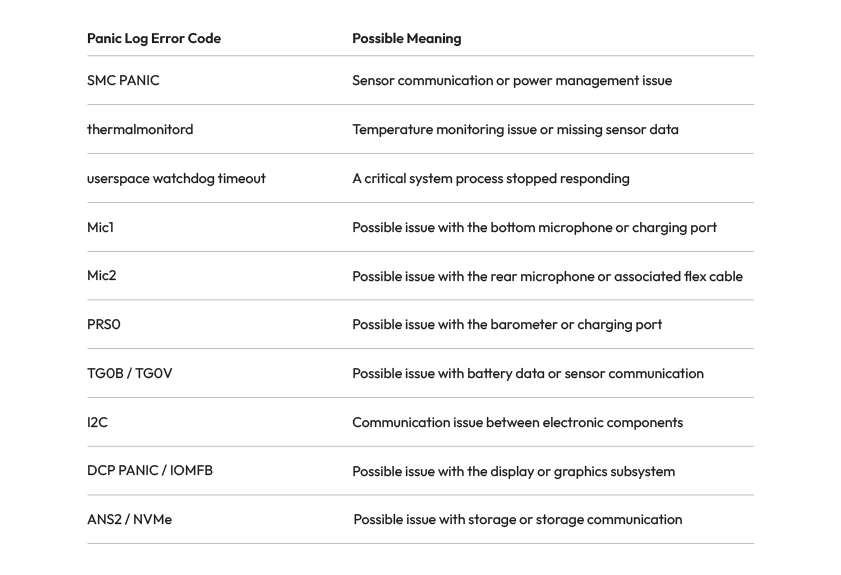
Fehlercodes wie „SMC PANIC“, „thermalmonitord“ und „Mic1“ können Hinweise auf mögliche Probleme mit Sensoren, der Temperaturüberwachung oder anderen Komponenten geben. Die genaue Bedeutung kann je nach iPhone-Modell variieren. VVerwende diese Fehlermeldungen daher als Ausgangspunkt für weitere Untersuchungen und nicht als endgültige Diagnose. Im unteren Teil des Blogs finden Sie eine Übersicht über alle Fehlercodes im iPhone-Panic-Log.
Warum unterscheiden sich die Panic-Log-Fehlercodes je nach iPhone-Modell?
Nicht jeder Panic-Log-Code hat bei jedem iPhone-Modell dieselbe Bedeutung.
Beispiel: Der Code 0x200000 kann bei einem iPhone 14 auf ein Problem mit dem Näherungssensor hinweisen, während derselbe Code bei einem Standard-iPhone 15 mit dem Modul für das kabellose Laden zusammenhängen kann.
Überprüfe daher immer das genaue iPhone-Modell, bevor Sie einen Fehlercode einem bestimmten Bauteil zuordnen.
Außerdem können mehrere Sensorprobleme gleichzeitig auftreten. Ein Fehlercode allein reicht daher nicht aus, um mit Sicherheit festzustellen, welches Bauteil ausgetauscht werden muss.
So nutzt du Panic Logs bei der Aufnahme eines Reparaturauftrags
Möchtest du Panic Logs in deinem Reparaturbetrieb einsetzen? Dann mache die Überprüfung bestehender Fehlermeldungen zu einem Bestandteil Ihres Aufnahmeprozesses, wenn dies angebracht ist. Im Folgenden stellen wir dir drei Punkte vor, die dir helfen, diese Informationen effektiv zu nutzen:
Überprüfe das Gerät vor der Reparatur: Frage nach bestehenden Problemen und überprüfen Sie mit Zustimmung des Kunden, ob relevante Panic-Logs vorliegen.
Besprich Fehlermeldungen mit dem Kunden: Erläutere, was die gefundenen Fehlercodes möglicherweise bedeuten, und besprechen Sie, ob weitere Untersuchungen erforderlich sind.
Halte deine Feststellungen fest: Notiere relevante Fehlermeldungen und den Zustand des Geräts im Reparaturauftrag. So kannst du im Nachhinein belegen, welche Probleme möglicherweise bereits vor der Reparatur bestanden.
Indem du diese Schritte in deine Arbeitsweise integrierst, kannst du gezieltere Diagnosen stellen und dazu beitragen, Missverständnisse mit Kunden zu vermeiden.
Das richtige iPhone-Ersatzteil für deine Reparatur
Deutet ein „Panic Log“ auf ein mögliches Hardwareproblem hin? Überprüfe in diesem Fall zunächst die Ursache, bevor Sie ein Ersatzteil austauschen.
Bei Foneday findest du mehr als 15.000 Smartphone-Ersatzteile für professionelle Reparaturbetriebe. Von iPhone-Akkus und Displays bis hin zu Ladeanschlüssen und anderen Ersatzteilen: Entdecke unser Sortiment und bestelle ganz einfach, was du für deine nächste Reparatur benötigst.
Entdecke unsere iPhone-Ersatzteile →

FAQ: Häufig gestellte Fragen zu iPhone Panic Logs
Was ist ein „Panic Log“ auf einem iPhone?
Ein „Panic Log“ ist ein Systembericht, der erstellt werden kann, wenn auf einem iPhone ein schwerwiegender Fehler auftritt. Der Bericht enthält technische Informationen, die Reparaturfachleuten dabei helfen können, mögliche Hardware- oder Softwareprobleme zu untersuchen.
Wie kann man ein iPhone-Panic-Log auslesen?
Gehe zu „Einstellungen“ → „Datenschutz und Sicherheit“ → „Analyse und Verbesserungen“ → „Analysedaten“. Suche anschließend nach einer Datei, deren Name „panic-full“ oder „panic.full“ enthält, und überprüfe die Fehlermeldung unter „panicString“.
Warum startet das iPhone immer wieder neu?
Ein iPhone, das regelmäßig neu startet, kann Probleme mit Sensoren, der Akku-Kommunikation, anderer Hardware oder Software haben. Ein Panic-Log kann Hinweise auf die mögliche Ursache liefern, doch sind weitere Untersuchungen weiterhin erforderlich.
Kann man anhand eines Panic Logs erkennen, welches Bauteil defekt ist?
Nicht immer. Manche Fehlercodes beziehen sich auf ein bestimmtes Bauteil oder einen bestimmten Sensor, aber dieselbe Fehlermeldung kann mehrere Ursachen haben. Überprüfe daher immer das iPhone-Modell und führe zusätzliche Tests durch, bevor du ein Bauteil austauschst.
Ist es sinnvoll, vor einer Reparatur das Panic Log zu überprüfen?
Ja, vor allem wenn sich ein iPhone unerwartet neu startet oder andere Systemprobleme aufweist. Mit Zustimmung des Kunden kannst du vorhandene Panic Logs überprüfen und relevante Erkenntnisse festhalten. So kannst du mögliche Probleme im Voraus besprechen und dazu beitragen, Missverständnisse im Nachhinein zu vermeiden.
Übersicht über die iPhone-Panic-Log-Fehlercodes nach Modell
Möchtest du wissen, was ein bestimmter „iPhone Panic Log“-Fehlercode bedeutet? In der folgenden Übersicht findest du Fehlercodes für verschiedene iPhone-Modelle, von älteren Geräten bis hin zu den neuesten Generationen.
Anhand des Fehlercodes kannst du erkennen, welche Komponente möglicherweise Probleme verursacht und wie zuverlässig die verfügbaren Informationen sind. Bitte beachte, dass derselbe Fehlercode bei verschiedenen iPhone-Modellen eine unterschiedliche Bedeutung haben kann.
Nutze diese Übersicht als Hilfestellung bei der Diagnose und Überprüfe stets die genaue Ursache, bevor Sie ein Bauteil austauschen.
General iPhone Panic Log Error Codes
iPhone Model / Error Family | Error Code | Possible Cause | Confidence |
|---|---|---|---|
Watchdog | logd | Software (iOS or restored data); no specific component identified | Medium |
Watchdog | springboard | Software (iOS); no specific component identified | Medium |
Watchdog | wifid | Check software first; otherwise Wi-Fi/Bluetooth module on the logic board | Low |
Watchdog | thermalmonitord | Probably software if no missing sensor is reported | Low |
AOP | bosch | Charging port flex carrying speaker signals | Medium |
AOP | no_pulse | Taptic Engine, audio codec or upper sensor flex after corrosion | Low |
AOP | dart | Unknown; linked to a faulty Taptic Engine in one reported case | Low |
AOP | data_abort | Processor connections or NAND on the logic board | Low |
AOP | pulse_pearl | Possible Face ID/TrueDepth module; unconfirmed | Low |
Secure Enclave | sep_rom | SEP ROM chip, EEPROM or connection to the processor | Medium |
Secure Enclave | sep_panic | Logic board or corrupted firmware/iOS | Low |
Secure Enclave | sep_mpm | Logic board, Secure Enclave | Low |
NAND storage | ans2 | NAND storage or communication lines | Medium |
NAND storage | nvme | NAND storage or power rails | Low |
NAND storage | ans | NAND storage or communication with the processor | Low |
NAND storage | h2fmi | NAND or storage controller on older models | Low |
Display | iomfb | Display assembly; possibly logic board | Low |
Display | dcp | Display subsystem or logic board; unconfirmed | Low |
Display | apt-firmware | Possible display assembly; unconfirmed | Low |
I2C | als | Front camera flex or ambient light sensor | Medium |
I2C | audio-speaker-top | Earpiece speaker or front camera/sensor flex | Low |
I2C | roswell | Display or touchscreen controller | Low |
I2C | display-pmu | OLED display power circuit | Low |
I2C | display-eeprom | Display or I2C3 connection on the logic board | Low |
I2C | ad5860 | Charging port flex or Taptic Engine | Medium |
I2C | mic-temp-sens | Possible Lightning charging port flex | Low |
I2C | i2c2 | Front camera flex or other components on the same bus | Low |
I2C | i2c3 | Display, touchscreen, display connector or charging port | Low |
Processor | sochot | Logic board, power management or overheating; check Wi-Fi/audio areas | Medium |
Processor | amcc | Processor, memory or cache controller | Low |
Processor | pmp | Processor power supply | Low |
Processor | sleepwake | Software or possibly audio codec/processor power supply | Low |
Wi-Fi/Bluetooth | wlan | Wi-Fi/Bluetooth module or antenna | Medium |
Modem | baseband | Baseband modem on the logic board | Low |
Software | undef_instr | iOS or incompatible app; possibly RAM/NAND | Medium |
Software | physmap-fault | Software first; possibly memory or logic board | Low |
Software | ifetch_abort | Software or logic board; cause unknown | Low |
Software | ppl | Kernel software or memory corruption | Low |
Unknown | socd-ap-wdt | Unresponsive processor; investigate software first | Low |
Unknown | socd-iboot | Unknown; additional information in SOCDContainers | Low |
Unknown | mfm-port-enable | Possible Wi-Fi/Bluetooth or PCIe connection; unconfirmed | Low |
Processor | fed-l1c-iside-parity | Processor or logic board, instruction cache error | Low |
Processor | halt_cpu | Secondary message; check the main panic code | Low |
Watchdog | Not specified | Usually software; possibly hardware if the issue persists after restoring | Low |
AOP | Not specified | Power button flex or front camera assembly | Medium |
AOP | Not specified | Sensor connected to the AOP coprocessor; component unknown | Low |
I2C | Not specified | Component on the affected I2C bus; model-dependent | Low |
SMC | Not specified | Components on the SMC I2C master bus | Low |
SMC | Not specified | Processor power rails and inductors | Low |
SMC | data_abort | Processor communication on the logic board | Low |
Software | data_abort | Software, graphics driver or possibly hardware | Low |
iPhone 7, 8, X, XR, XS, SE, 11 and 12 – Error Codes
iPhone Model / Error Family | Error Code | Possible Cause | Confidence |
|---|---|---|---|
iPhone 7 | tg0b | Battery or battery connector | High |
iPhone 7 Plus | tg0b | Battery or battery connector | High |
iPhone 8 | tg0b | Battery or battery connector | Medium |
iPhone 8 Plus | tg0b | Battery or battery connector | Medium |
iPhone X | tg0b | Battery, connector or data lines | High |
iPhone X | tg0v | Battery, connector or data lines | High |
iPhone SE (1st generation) | tg0b | Battery or resistor near the battery connector | Medium |
iPhone SE (1st generation) | tg0v | Battery or data lines | Low |
iPhone 7 | tg0v | Battery or data lines | Low |
iPhone 7 Plus | tg0v | Battery or data lines | Low |
iPhone 8 | tg0v | Battery or data lines | Low |
iPhone 8 Plus | tg0v | Battery or data lines | Low |
iPhone X | prs0 | Charging port flex or barometer | High |
iPhone X | mic1 | Charging port flex or bottom microphone | Medium |
iPhone 7 | mic1 | Charging port flex or bottom microphone | Low |
iPhone 7 Plus | mic1 | Charging port flex or bottom microphone | Low |
iPhone 8 | mic1 | Charging port flex or bottom microphone | Low |
iPhone 8 Plus | mic1 | Charging port flex or bottom microphone | Low |
iPhone 7 | prs0 | Charging port flex or barometer | Low |
iPhone 7 Plus | prs0 | Charging port flex or barometer | Low |
iPhone 8 | prs0 | Charging port flex or barometer | Low |
iPhone 8 Plus | prs0 | Charging port flex or barometer | Low |
iPhone X | mic2 | Power button/flash flex or rear microphone | Low |
iPhone 7 | mic2 | Power button/flash flex or rear microphone | Low |
iPhone 7 Plus | mic2 | Power button/flash flex or rear microphone | Low |
iPhone 8 | mic2 | Power button/flash flex or rear microphone | Low |
iPhone 8 Plus | mic2 | Power button/flash flex or rear microphone | Low |
iPhone 8 | tp1a | Temperature sensor on the logic board | Medium |
iPhone X | tp1a | Temperature sensor on the logic board | Low |
iPhone SE (1st generation) | tp1a | Temperature sensor near the rear camera | Low |
iPhone SE (1st generation) | tp3r | Temperature sensor on the logic board | Low |
iPhone XS Max | tp3r | Temperature sensor on the logic board | Low |
iPhone SE (2nd generation) | prs0 | Charging port flex or barometer | High |
iPhone XR | prs0 | Charging port flex or barometer | High |
iPhone XS | prs0 | Charging port flex or barometer | High |
iPhone XS Max | prs0 | Charging port flex or barometer | High |
iPhone 11 | prs0 | Charging port flex or barometer | High |
iPhone 11 Pro | prs0 | Charging port flex or barometer | High |
iPhone 11 Pro Max | prs0 | Charging port flex or barometer | High |
iPhone 12 | prs0 | Charging port flex or barometer | High |
iPhone 12 mini | prs0 | Charging port flex or barometer | High |
iPhone 12 Pro | prs0 | Charging port flex or barometer | High |
iPhone 12 Pro Max | prs0 | Charging port flex or barometer | High |
iPhone SE (2nd generation) | mic1 | Charging port flex or I2C connection on the logic board | Medium |
iPhone XR | mic1 | Charging port flex, bottom microphone | High |
iPhone XS | mic1 | Charging port flex, bottom microphone | High |
iPhone XS Max | mic1 | Charging port flex, bottom microphone | High |
iPhone 11 | mic1 | Charging port flex, bottom microphone | High |
iPhone 11 Pro | mic1 | Charging port flex, bottom microphone | High |
iPhone 11 Pro Max | mic1 | Charging port flex, bottom microphone | High |
iPhone 12 | mic1 | Charging port flex, bottom microphone | High |
iPhone 12 mini | mic1 | Charging port flex, bottom microphone | High |
iPhone 12 Pro | mic1 | Charging port flex, bottom microphone | High |
iPhone 12 Pro Max | mic1 | Charging port flex, bottom microphone | High |
iPhone SE (2nd generation) | mic2 | Power button flex or secondary microphone | High |
iPhone XR | mic2 | Power button flex or secondary microphone | High |
iPhone XS | mic2 | Power button flex or secondary microphone | High |
iPhone XS Max | mic2 | Power button flex or secondary microphone | High |
iPhone 11 | mic2 | Power button flex or secondary microphone | High |
iPhone 11 Pro | mic2 | Power button flex or secondary microphone | High |
iPhone 11 Pro Max | mic2 | Power button flex or secondary microphone | High |
iPhone 12 | mic2 | Power button flex or secondary microphone | High |
iPhone 12 mini | mic2 | Power button flex or secondary microphone | High |
iPhone 12 Pro | mic2 | Power button flex or secondary microphone | High |
iPhone 12 Pro Max | mic2 | Power button flex or secondary microphone | High |
iPhone SE (2nd generation) | tg0b | Battery or data line | High |
iPhone XR | tg0b | Battery or data line | High |
iPhone XS | tg0b | Battery or data line | High |
iPhone XS Max | tg0b | Battery or data line | High |
iPhone 11 | tg0b | Battery or data line | High |
iPhone 11 Pro | tg0b | Battery or charging port flex | High |
iPhone 11 Pro Max | tg0b | Battery or charging port flex | High |
iPhone 12 | tg0b | Battery or data line | High |
iPhone 12 mini | tg0b | Battery or data line | High |
iPhone 12 Pro | tg0b | Battery or data line | High |
iPhone 12 Pro Max | tg0b | Battery or data line | High |
iPhone SE (2nd generation) | tg0v | Battery or data line | High |
iPhone XR | tg0v | Battery or data line | High |
iPhone XS | tg0v | Battery or data line | High |
iPhone XS Max | tg0v | Battery or data line | High |
iPhone 11 | tg0v | Battery or data line | High |
iPhone 11 Pro | tg0v | Battery or charging port flex | High |
iPhone 11 Pro Max | tg0v | Battery or charging port flex | High |
iPhone 12 | tg0v | Battery or data line | High |
iPhone 12 mini | tg0v | Battery or data line | High |
iPhone 12 Pro | tg0v | Battery or data line | High |
iPhone 12 Pro Max | tg0v | Battery or data line | High |
iPhone SE (2nd generation) | tb0v | Battery | Low |
iPhone XR | tb0v | Battery | Low |
iPhone XS | tb0v | Battery | Low |
iPhone XS Max | tb0v | Battery | Low |
iPhone 11 | tb0v | Battery | Low |
iPhone 11 Pro | tb0v | Battery | Low |
iPhone 11 Pro Max | tb0v | Battery | Low |
iPhone 12 | tb0v | Battery | Low |
iPhone 12 mini | tb0v | Battery | Low |
iPhone 12 Pro | tb0v | Battery | Low |
iPhone 12 Pro Max | tb0v | Battery | Low |
iPhone 12 | eiger | Charging port flex | Low |
iPhone 12 mini | eiger | Charging port flex | Low |
iPhone 12 Pro | eiger | Charging port flex | Low |
iPhone 12 Pro Max | eiger | Charging port flex | Low |
iPhone 12 | tp3r | Temperature sensor on the logic board | Low |
iPhone 12 mini | tp3r | Temperature sensor on the logic board | Low |
iPhone 12 Pro | tp3r | Temperature sensor on the logic board | Low |
iPhone 12 Pro Max | tp3r | Temperature sensor on the logic board | Low |
iPhone XR | i2c0 | Charging port flex; possibly camera, battery connector or sensor flex | Medium |
iPhone XS | i2c0 | Charging port flex; possibly camera, battery connector or sensor flex | Medium |
iPhone XS Max | i2c0 | Charging port flex; possibly camera, battery connector or sensor flex | Medium |
iPhone 7 | Not specified | Light sensor, microphone, power button flex or Touch ID flex | Low |
iPhone 7 Plus | Not specified | Light sensor, microphone, power button flex or Touch ID flex | Low |
iPhone 8 | Not specified | Light sensor, microphone, power button flex or Touch ID flex | Low |
iPhone 8 Plus | Not specified | Light sensor, microphone, power button flex or Touch ID flex | Low |
iPhone X | Not specified | Light sensor, microphone, power button flex or Touch ID flex | Low |
iPhone SE (2nd generation) | Not specified | Light sensor, microphone, power button flex or Touch ID flex | Low |
iPhone SE (3rd generation) | 0x10000 | Possible power button flex; unconfirmed | Low |
iPhone 13 – SMC PANIC Error Codes
iPhone Model / Error Family | Error Code | Possible Cause | Confidence |
|---|---|---|---|
iPhone 13 | 0x800 | Charging port flex (Lightning) | High |
iPhone 13 mini | 0x800 | Charging port flex (Lightning) | High |
iPhone 13 Pro | 0x800 | Charging port flex (Lightning) | High |
iPhone 13 Pro Max | 0x800 | Charging port flex (Lightning) | High |
iPhone 13 | 0x1000 | Front sensor flex, proximity/ambient light sensor | High |
iPhone 13 mini | 0x1000 | Front sensor flex, proximity/ambient light sensor | High |
iPhone 13 Pro | 0x1000 | Front sensor flex, proximity/ambient light sensor | High |
iPhone 13 Pro Max | 0x1000 | Front sensor flex, proximity/ambient light sensor | High |
iPhone 13 | 0x10000 | Front sensor flex; source may be incorrect | Low |
iPhone 13 mini | 0x10000 | Front sensor flex; source may be incorrect | Low |
iPhone 13 Pro | 0x10000 | Front sensor flex; source may be incorrect | Low |
iPhone 13 Pro Max | 0x10000 | Front sensor flex; source may be incorrect | Low |
iPhone 13 | 0x4000 | Battery data or communication | Medium |
iPhone 13 mini | 0x4000 | Battery data or communication | Medium |
iPhone 13 Pro | 0x4000 | Battery data or communication | Medium |
iPhone 13 Pro Max | 0x4000 | Battery data or communication | Medium |
iPhone 13 | 0x40000 | Battery; source may be incorrect | Low |
iPhone 13 mini | 0x40000 | Battery; source may be incorrect | Low |
iPhone 13 Pro | 0x40000 | Battery; source may be incorrect | Low |
iPhone 13 Pro Max | 0x40000 | Battery; source may be incorrect | Low |
iPhone 13 | 0x1800 | Charging port flex and front sensor flex | High |
iPhone 13 mini | 0x1800 | Charging port flex and front sensor flex | High |
iPhone 13 Pro | 0x1800 | Charging port flex and front sensor flex | High |
iPhone 13 Pro Max | 0x1800 | Charging port flex and front sensor flex | High |
iPhone 13 mini | 0x400 | Gyroscope on the lower logic board | High |
iPhone 13 mini | 0xc00 | Lower logic board and charging port flex | Low |
iPhone 14 and 14 Plus – SMC PANIC Error Codes
iPhone Model / Error Family | Error Code | Possible Cause | Confidence |
|---|---|---|---|
iPhone 14 | 0x100000 | Charging port flex | High |
iPhone 14 Plus | 0x100000 | Charging port flex | High |
iPhone 14 | 0x200000 | Proximity sensor | High |
iPhone 14 Plus | 0x200000 | Proximity sensor | High |
iPhone 14 | 0x400000 | Wireless charging coil (MagSafe) | High |
iPhone 14 Plus | 0x400000 | Wireless charging coil (MagSafe) | High |
iPhone 14 | 0x300000 | Charging port flex and proximity sensor | High |
iPhone 14 Plus | 0x300000 | Charging port flex and proximity sensor | High |
iPhone 14 | 0x500000 | Charging port flex and wireless charging coil; possibly battery | Medium |
iPhone 14 Plus | 0x500000 | Charging port flex and wireless charging coil; possibly battery | Medium |
iPhone 14 | 0x600000 | Wireless charging coil and proximity sensor | High |
iPhone 14 Plus | 0x600000 | Wireless charging coil and proximity sensor | High |
iPhone 14 | 0x700000 | Charging port, wireless charging coil and proximity sensor | High |
iPhone 14 Plus | 0x700000 | Charging port, wireless charging coil and proximity sensor | High |
iPhone 14 | 0x20000 | Connection between logic board layers | Low |
iPhone 14 Plus | 0x20000 | Connection between logic board layers | Low |
iPhone 14 | 0x40000000 | Battery temperature/voltage sensors (TB0T/TB0V) | Medium |
iPhone 14 Plus | 0x40000000 | Battery temperature/voltage sensors (TB0T/TB0V) | Medium |
iPhone 14 Pro and Pro Max – SMC PANIC Error Codes
iPhone Model / Error Family | Error Code | Possible Cause | Confidence |
|---|---|---|---|
iPhone 14 Pro | 0x41 | Battery data | High |
iPhone 14 Pro Max | 0x41 | Battery data | High |
iPhone 14 Pro | 0x20000 | Gyroscope or connection between logic board layers | High |
iPhone 14 Pro Max | 0x20000 | Gyroscope or connection between logic board layers | High |
iPhone 14 Pro | 0x40000 | Charging port flex | High |
iPhone 14 Pro Max | 0x40000 | Charging port flex | High |
iPhone 14 Pro | 0x80000 | Front sensor flex, proximity sensor | High |
iPhone 14 Pro Max | 0x80000 | Front sensor flex, proximity sensor | High |
iPhone 14 Pro | 0x100000 | Power button flex | High |
iPhone 14 Pro Max | 0x100000 | Power button flex | High |
iPhone 14 Pro | 0xc0000 | Charging port flex and front sensor flex | High |
iPhone 14 Pro Max | 0xc0000 | Charging port flex and front sensor flex | High |
iPhone 14 Pro | 0x180000 | Front sensor flex and power button flex | Low |
iPhone 14 Pro Max | 0x180000 | Front sensor flex and power button flex | Low |
iPhone 14 Pro | 0x140000 | Power button flex and charging port flex | Low |
iPhone 14 Pro Max | 0x140000 | Power button flex and charging port flex | Low |
iPhone 14 Pro | 0x1c0000 | Charging port, power button and front sensors | Medium |
iPhone 14 Pro Max | 0x1c0000 | Charging port, power button and front sensors | Medium |
iPhone 14 Pro | 0xa0000 | Gyroscope/logic board connection and front sensor flex | Low |
iPhone 14 Pro Max | 0xa0000 | Gyroscope/logic board connection and front sensor flex | Low |
iPhone 14 Pro | 0x1400000 | USB module circuit, microphone component or connection to power management | High |
iPhone 14 Pro Max | 0x1400000 | USB module circuit, microphone component or connection to power management | High |
iPhone 14 Pro | 0x1800000 | Proximity sensor module or internal electronics | High |
iPhone 14 Pro Max | 0x1800000 | Proximity sensor module or internal electronics | High |
iPhone 15 and 15 Plus – SMC PANIC Error Codes
iPhone Model / Error Family | Error Code | Possible Cause | Confidence |
|---|---|---|---|
iPhone 15 | 0xa1 | Battery data | High |
iPhone 15 Plus | 0xa1 | Battery data | High |
iPhone 15 | 0x80000 | USB-C charging port flex or barometer | High |
iPhone 15 Plus | 0x80000 | USB-C charging port flex or barometer | High |
iPhone 15 | 0x100000 | Front sensor flex, proximity sensor | High |
iPhone 15 Plus | 0x100000 | Front sensor flex, proximity sensor | High |
iPhone 15 | 0x200000 | Wireless charging coil (MagSafe) | High |
iPhone 15 Plus | 0x200000 | Wireless charging coil (MagSafe) | High |
iPhone 15 | 0x280000 | Wireless charging coil and charging port flex | Low |
iPhone 15 Plus | 0x280000 | Wireless charging coil and charging port flex | Low |
iPhone 15 | 0x380000 | Wireless charging coil, charging port and front sensors | Low |
iPhone 15 Plus | 0x380000 | Wireless charging coil, charging port and front sensors | Low |
iPhone 15 Pro and Pro Max – SMC PANIC Error Codes
iPhone Model / Error Family | Error Code | Possible Cause | Confidence |
|---|---|---|---|
iPhone 15 Pro | 0xa1 | Battery data | High |
iPhone 15 Pro Max | 0xa1 | Battery data | High |
iPhone 15 Pro | 0x100000 | USB-C charging port flex | Medium |
iPhone 15 Pro Max | 0x100000 | USB-C charging port flex | Medium |
iPhone 15 Pro | 0x200000 | Front sensor flex, proximity sensor | High |
iPhone 15 Pro Max | 0x200000 | Front sensor flex, proximity sensor | High |
iPhone 15 Pro | 0x300000 | USB-C charging port flex, possibly also front sensor flex | High |
iPhone 15 Pro Max | 0x300000 | USB-C charging port flex, possibly also front sensor flex | High |
iPhone 15 Pro | 0x400000 | Wireless charging coil (MagSafe) | High |
iPhone 15 Pro Max | 0x400000 | Wireless charging coil (MagSafe) | High |
iPhone 15 Pro | 0x500000 | Charging port flex and wireless charging coil | High |
iPhone 15 Pro Max | 0x500000 | Charging port flex and wireless charging coil | High |
iPhone 15 Pro | 0x600000 | Wireless charging coil and proximity sensor | High |
iPhone 15 Pro Max | 0x600000 | Wireless charging coil and proximity sensor | High |
iPhone 15 Pro | 0x700000 | Charging port, wireless charging coil and possibly proximity sensor | High |
iPhone 15 Pro Max | 0x700000 | Charging port, wireless charging coil and possibly proximity sensor | High |
iPhone 15 Pro | 0x1000000 | USB module circuit, microphone component or connection to power management | High |
iPhone 15 Pro Max | 0x1000000 | USB module circuit, microphone component or connection to power management | High |
iPhone 16, 16 Plus and 16e – SMC PANIC Error Codes
iPhone Model / Error Family | Error Code | Possible Cause | Confidence |
|---|---|---|---|
iPhone 16e | 0x80000 | Possible USB-C charging port flex or barometer; unconfirmed | Low |
iPhone 16 | 0x80000 | USB-C charging port flex or barometer | Medium |
iPhone 16 Plus | 0x80000 | USB-C charging port flex or barometer | Medium |
iPhone 16 | 0x180000 | Charging port flex or barometer | Low |
iPhone 16 Plus | 0x180000 | Charging port flex or barometer | Low |
iPhone 16 | 0x200000 | Wireless charging coil | Medium |
iPhone 16 Plus | 0x200000 | Wireless charging coil | Medium |
iPhone 16 | 0xa9 | Battery communication | Low |
iPhone 16 Plus | 0xa9 | Battery communication | Low |
iPhone 16 | 0x380000 | Charging port and wireless charging coil or connection between logic board layers | Low |
iPhone 16 Plus | 0x380000 | Charging port and wireless charging coil or connection between logic board layers | Low |
iPhone 16 Pro and Pro Max – SMC PANIC Error Codes
iPhone Model / Error Family | Error Code | Possible Cause | Confidence |
|---|---|---|---|
iPhone 16 Pro | 0x300000 | USB-C charging port flex or barometer | High |
iPhone 16 Pro Max | 0x300000 | USB-C charging port flex or barometer | High |
iPhone 16 Pro | 0x200000 | Charging port assembly, microphone or barometer; disputed interpretation | Low |
iPhone 16 Pro Max | 0x200000 | Charging port assembly, microphone or barometer; disputed interpretation | Low |
iPhone 16 Pro | 0x100000 | USB-C charging port flex | Low |
iPhone 16 Pro Max | 0x100000 | USB-C charging port flex | Low |
iPhone 16 Pro | 0xa9 | Battery communication | Low |
iPhone 16 Pro Max | 0xa9 | Battery communication | Low |
iPhone 16 Pro | 0x400000 | Wireless charging coil or logic board connector | Low |
iPhone 16 Pro Max | 0x400000 | Wireless charging coil or logic board connector | Low |
iPhone 17 Pro, Pro Max, Air and 18 Pro
iPhone Model / Error Family | Error Code | Possible Cause | Confidence |
|---|---|---|---|
iPhone 17 Pro | 0x800000 | Wireless charging coil | Low |
iPhone 17 Pro Max | 0x800000 | Wireless charging coil | Low |
iPhone 17 Pro | 0x600000 | USB-C charging port flex or barometer | Low |
iPhone 17 Pro Max | 0x600000 | USB-C charging port flex or barometer | Low |
iPhone 17 Pro | 0x200000 | USB-C charging port or barometer module | Low |
iPhone 17 Pro Max | 0x200000 | USB-C charging port or barometer module | Low |
iPhone Air | 0x2000000 | Wireless charging coil | Low |
iPhone Air | 0x3800000 | USB-C charging port flex or barometer | Low |
iPhone 18 Pro | 0xa9 | Battery temperature sensor (TB0T) | Low |
Wichtig: Diese Fehlercodes weisen auf mögliche Ursachen hin und stellen keine endgültige Diagnose dar. Die Bedeutung kann je nach iPhone-Modell variieren. Überprüfe immer das vollständige Panic Log und teste die entsprechenden Komponenten, bevor du diese austauschst. Fehlercodes mit geringer Zuverlässigkeit sind nicht bestätigt oder basieren auf begrenzten Informationen.
Bleiben Sie außerdem über die neuesten Entwicklungen auf dem Laufenden, indem Sie unsere Blogs lesen und uns auf LinkedIn und YouTube folgen.


